Redesigning the information architecture of a non-profit mobility initiative to better communicate its identity, support community participation, and build institutional credibility.
my role
Team
tools
Figma, UXTweak, ScreamingFrog
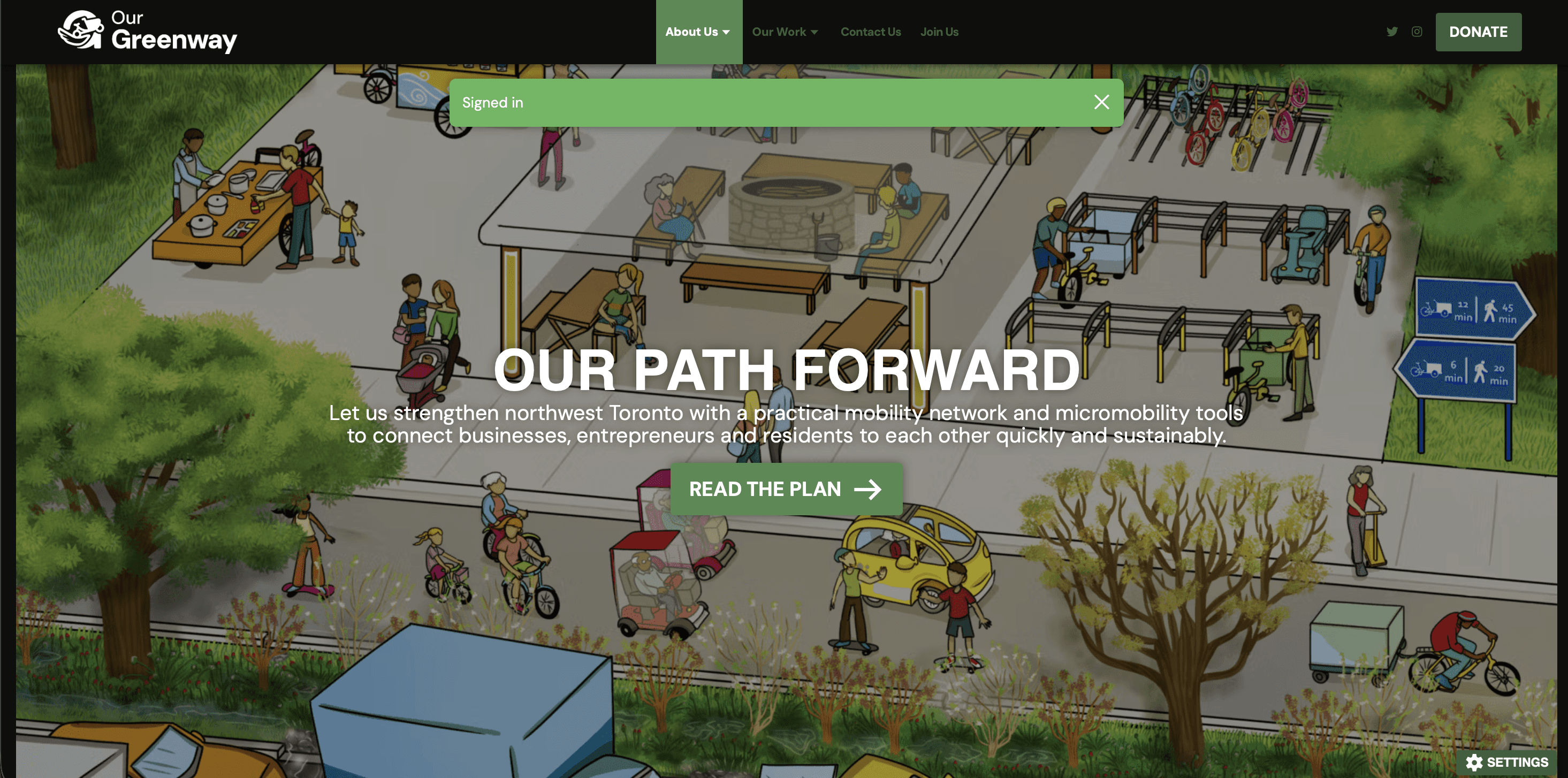
Redesigning the information architecture of a non-profit mobility initiative to better communicate its identity, support community participation, and build institutional credibility.
Researcher, design and prototype lead
Researcher, design and prototype lead
3 other UX design students
3 other UX design students
Figma, UXTweak, ScreamingFrog
During my 8-month internship with Brightly (a Siemens company), I led the end-to-end design of a critical sustainability platform integration while balancing dual responsibilities as both UX Designer and Product Owner.
Working alongside managers and team leads who championed ownership and autonomy, I conducted user research that influenced organizational-level decisions and delivered features now used by Sustainability Managers, Implementation Partners, and Building Managers across North America.
Our Greenway had outgrown its own website — and it was costing them funders, partners, and community members before a single conversation could begin.
An evidence-based IA redesign proposal with restructured navigation, a dedicated Events pathway, a consolidated research hub, and improved cross-site trust signals — grounded in usability testing, card sorting, stakeholder interviews, and a full content audit.
Our Greenway gave us a clear brief: the website needed to grow with the organization. With that direction, we ran four research methods to understand where the website was falling short and for whom.
Our primary research included 8 sessions across two groups:
Six participants ranging from long-time community members to first-time visitors, completed task-based usability tests, navigating the live site while thinking aloud, and an open card sort.
Two organizational leads (the Treasurer and Operations Manager) shared the gap between how the organization saw itself and how the website represented it.
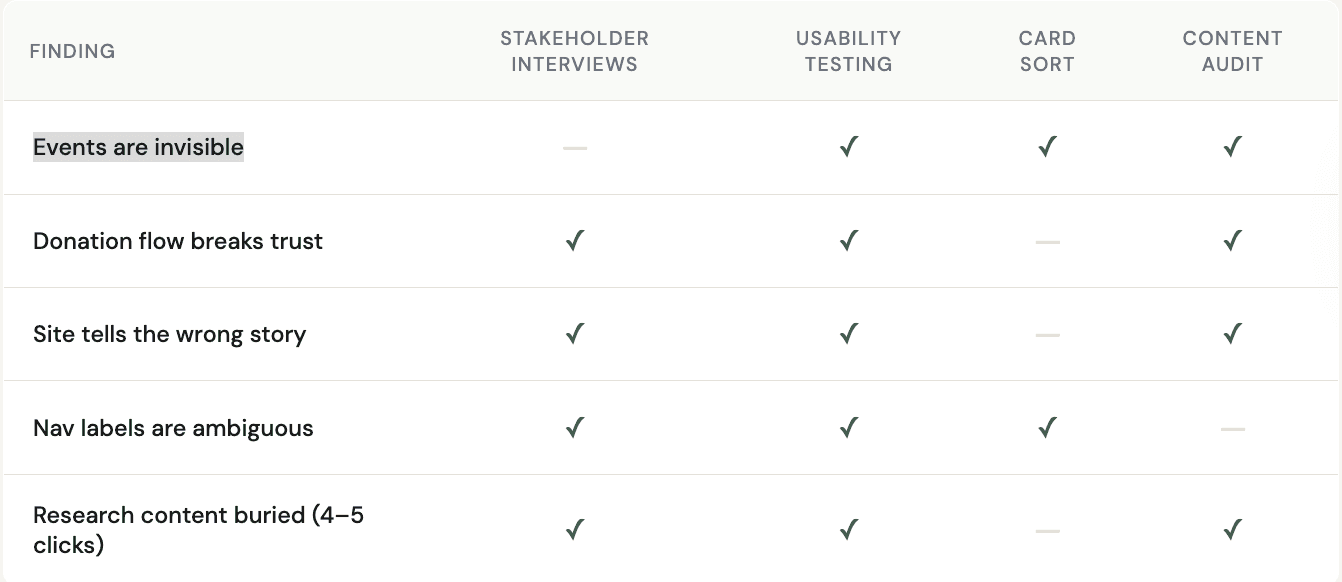
All findings were analyzed through affinity mapping and triangulated across methods to surface patterns. Here's what emerged:
Users arrived knowing what they wanted like events, research, and ways to donate, but the site's structure consistently sent them in the wrong direction.
The website still spoke the language of a single-corridor initiative. For funders, partners, and citywide community members, that mismatch quietly questioned credibility.
Being redirected to an unknown third-party portal mid-donation doesn't just create friction, but it triggers doubt.
A website that's hard to navigate signals disorganization and for Our Greenway to attract funders and community members alike, the experience needed to feel as polished and intentional as the work behind it.
Three very different people were arriving at the same website — and leaving without what they came for.
I did not understand the website. It is complicated to navigate — there's no clear mission, vision, or experience of what we have done.
- Internal Stakeholders
When I go to this page, it shows York University — it might make me feel it's "a phishing website.
- UT1 (While completing a donation related task)
It's unfortunate that events doesn't have its own tab.
- UT3 (while after completing the task to find an event
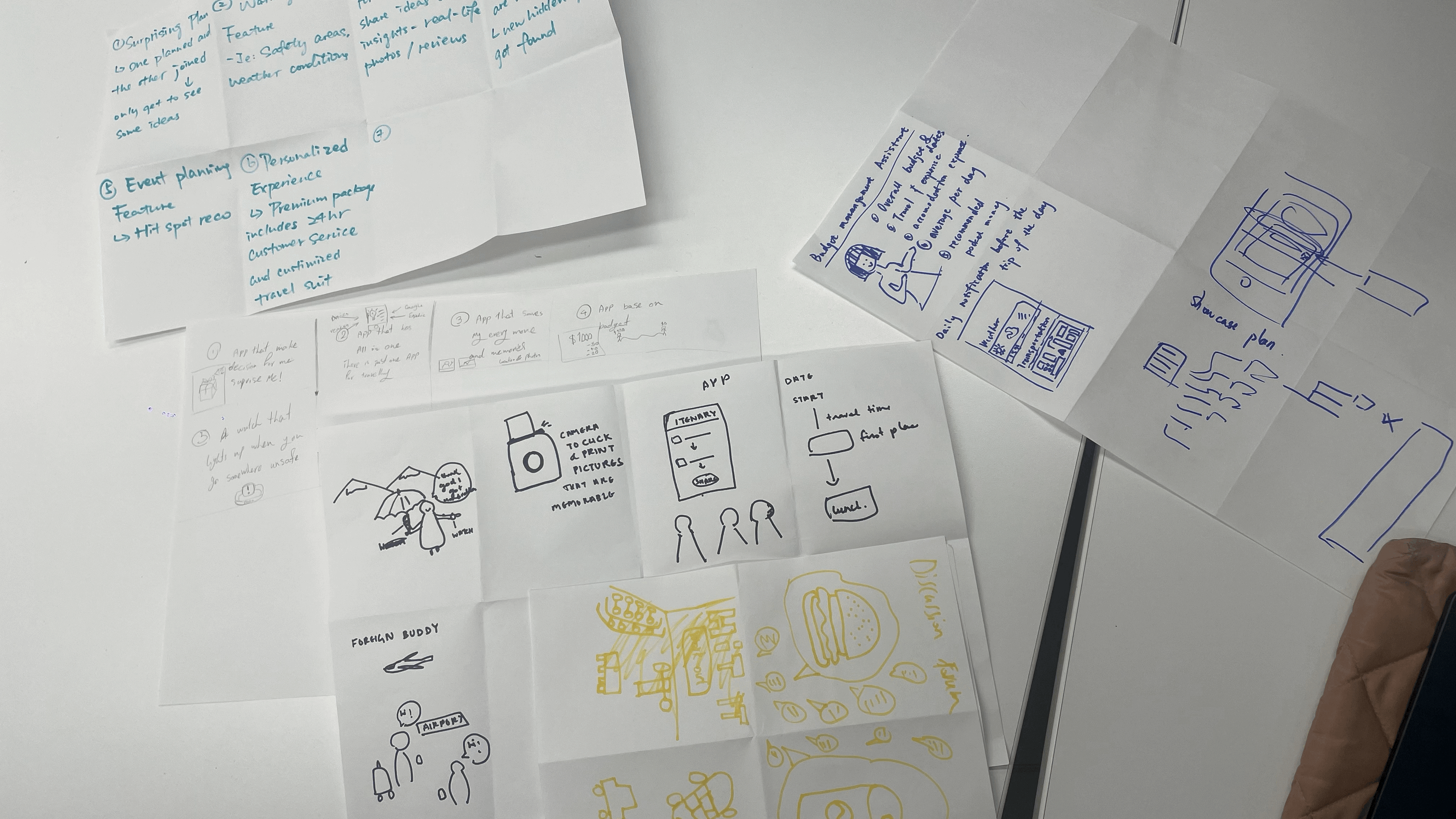
To expand on our thought process, we utilized "the crazy 8" exercises to extract the ideas that had been forming in our heads since the research phase. Our brainstorming session entailed 5-minute intervals of 8 sketches. I did not compose eight sketches, but this exercise forced me to push out ideas. This was a great exercise to get my ideas on paper.
After this exercise, we transferred our ideas to stickies and prioritized our features to finalize our final features.
Shortlisted places and trip ideas from different social media will be automatically organized into curated folders in the wishlist.
Share the trip plan with your travel buddies for better collaboration.
When planning a trip to a certain place, the app will automatically pull applicable wishlist items into itineraries, eliminating the task of cross-referencing.
Generate personalized Itinerary using user preferences.
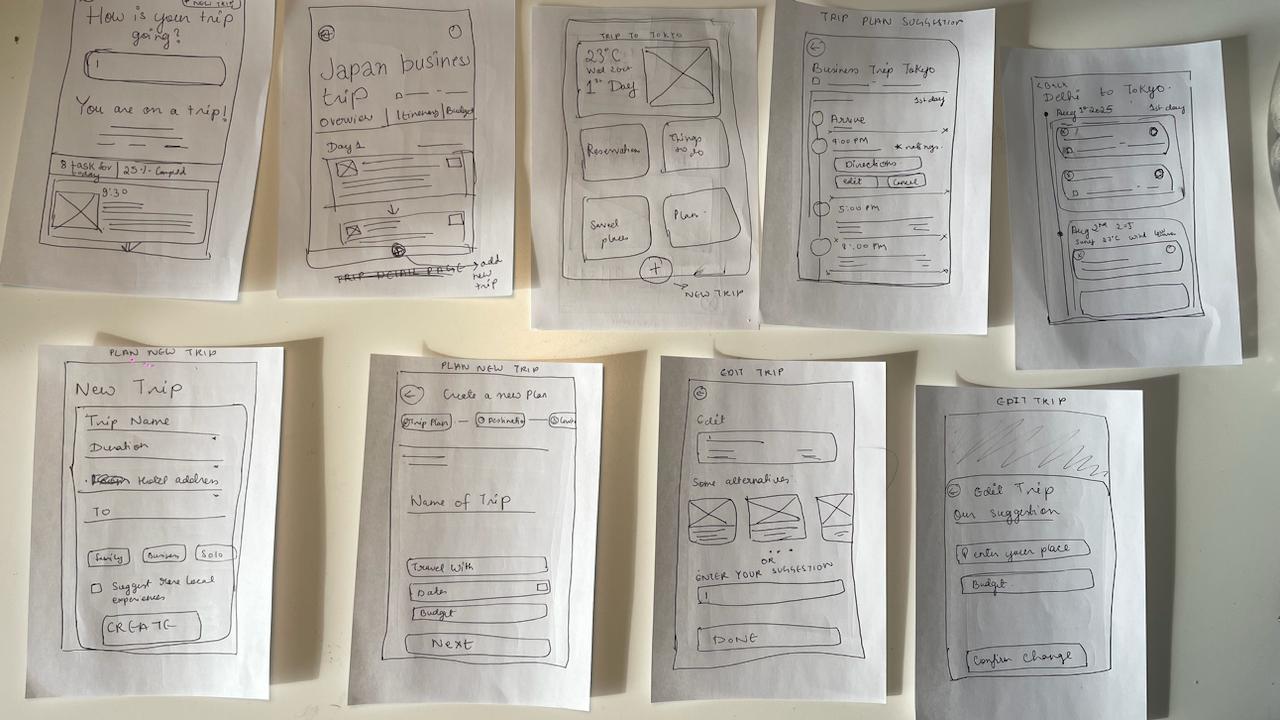
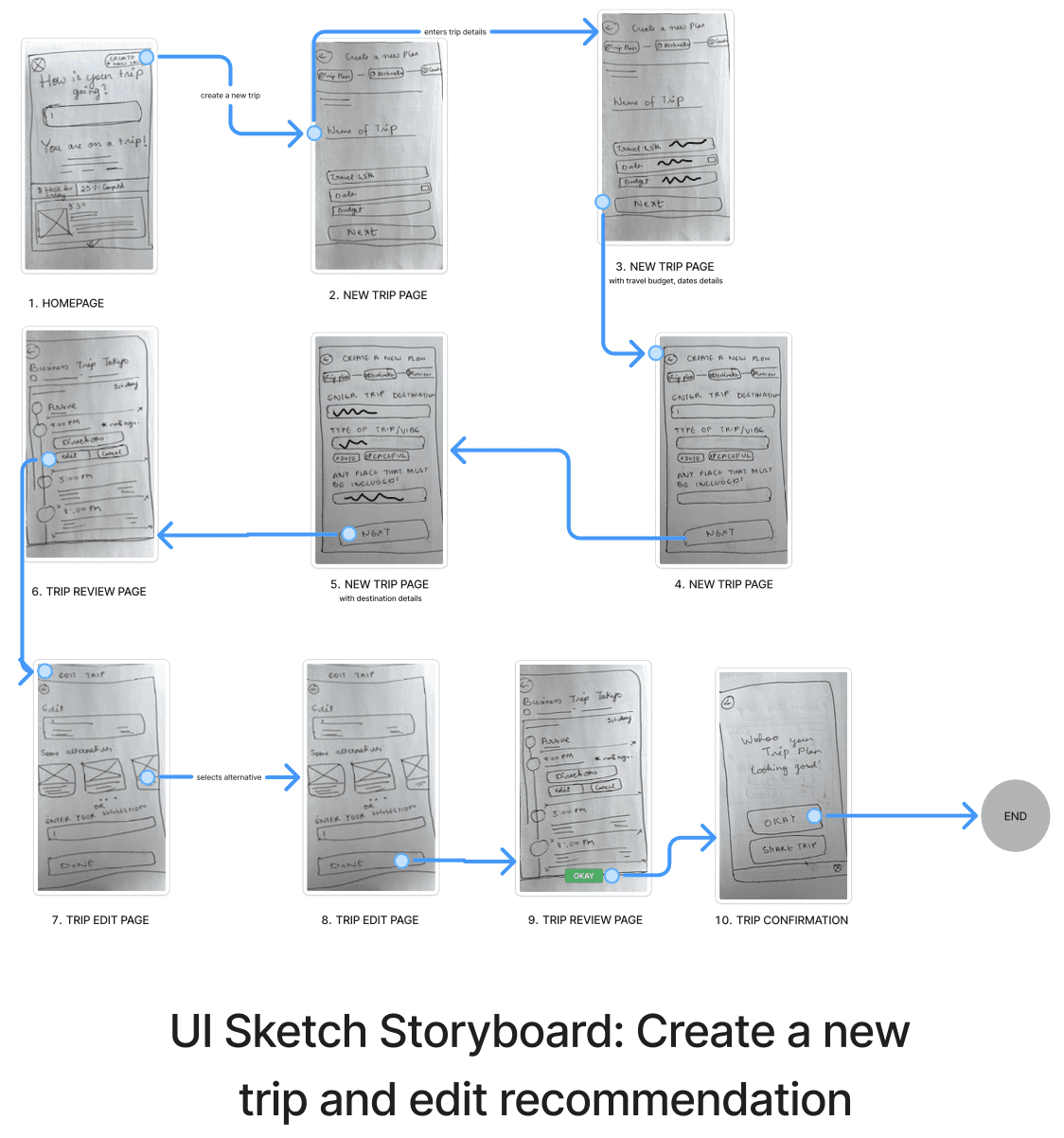
We finalized our key user screens (wishlist, profile, explore etc.) and sketched at least two options for each screen. Once every team member had sketched at least 2 options, our team met again to discuss our UI sketches.
We then picked the best parts from our designs, keeping in mind our users.
The next step was the creation of lo-fi wireframes and creating a prototype for user testing. We as a team had decided on a usability script and the task we would ask to be carried out.
I gained some really useful insights by observing the participants and the way they complete a task.
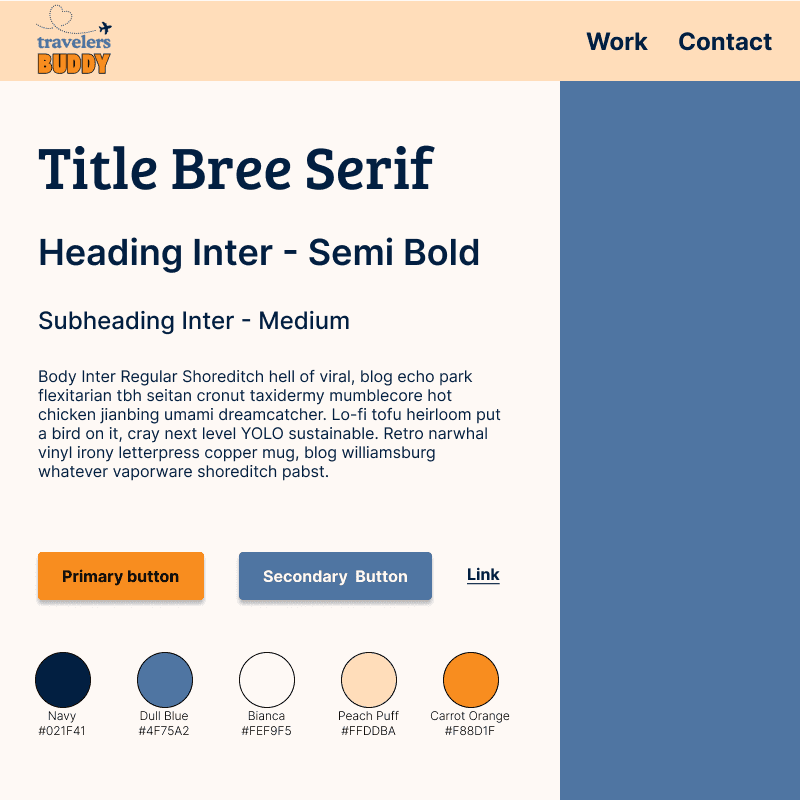
The brand color palette balances energy, tranquility, and is WCAG 2.0 level AA. Vibrant orange brings dynamic energy to key interaction points, particularly the call-to-action buttons like "Plan Trip," while a subtle, lighter background creates visual harmony.
The typography emphasizes clean, straightforward fonts that prioritize readability, ensuring users can easily navigate their journey from start to finish.
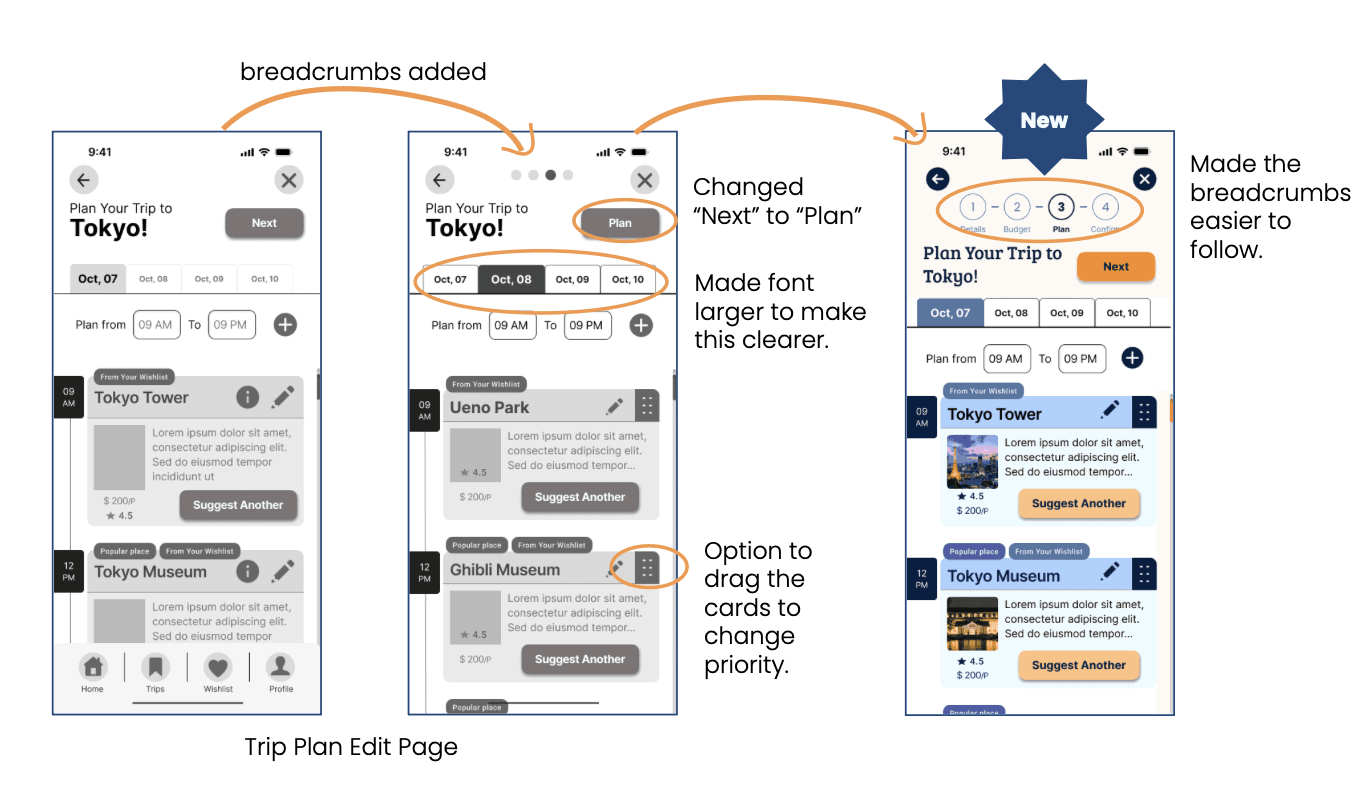
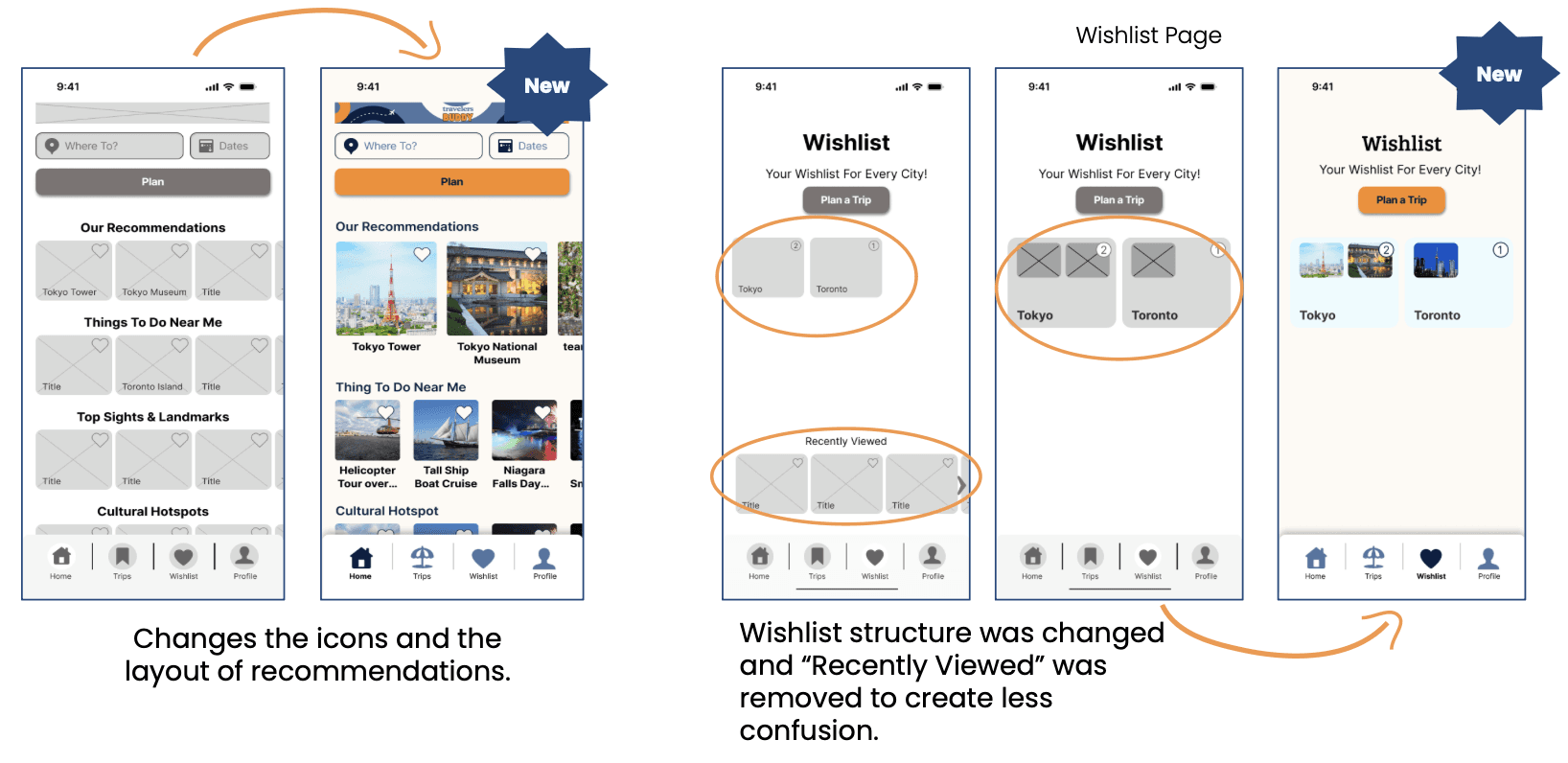
While we initially highlighted curated folders as a key feature, we felt this wasn’t a strong enough differentiator. Determined to address this, I took it upon myself to identify another unique aspect that could set our app apart.
Through user interviews, we uncovered an interesting insight: social media plays a major role in travel planning. 6 out of 10 participants mentioned social media as a key influence in their decision-making process. However, we also identified a major pain point: users struggle to save and revisit travel ideas they discover on platforms like Instagram and TikTok. Once they like a post, it often gets lost in their feed, making it difficult to refer back to when they start planning their trip.
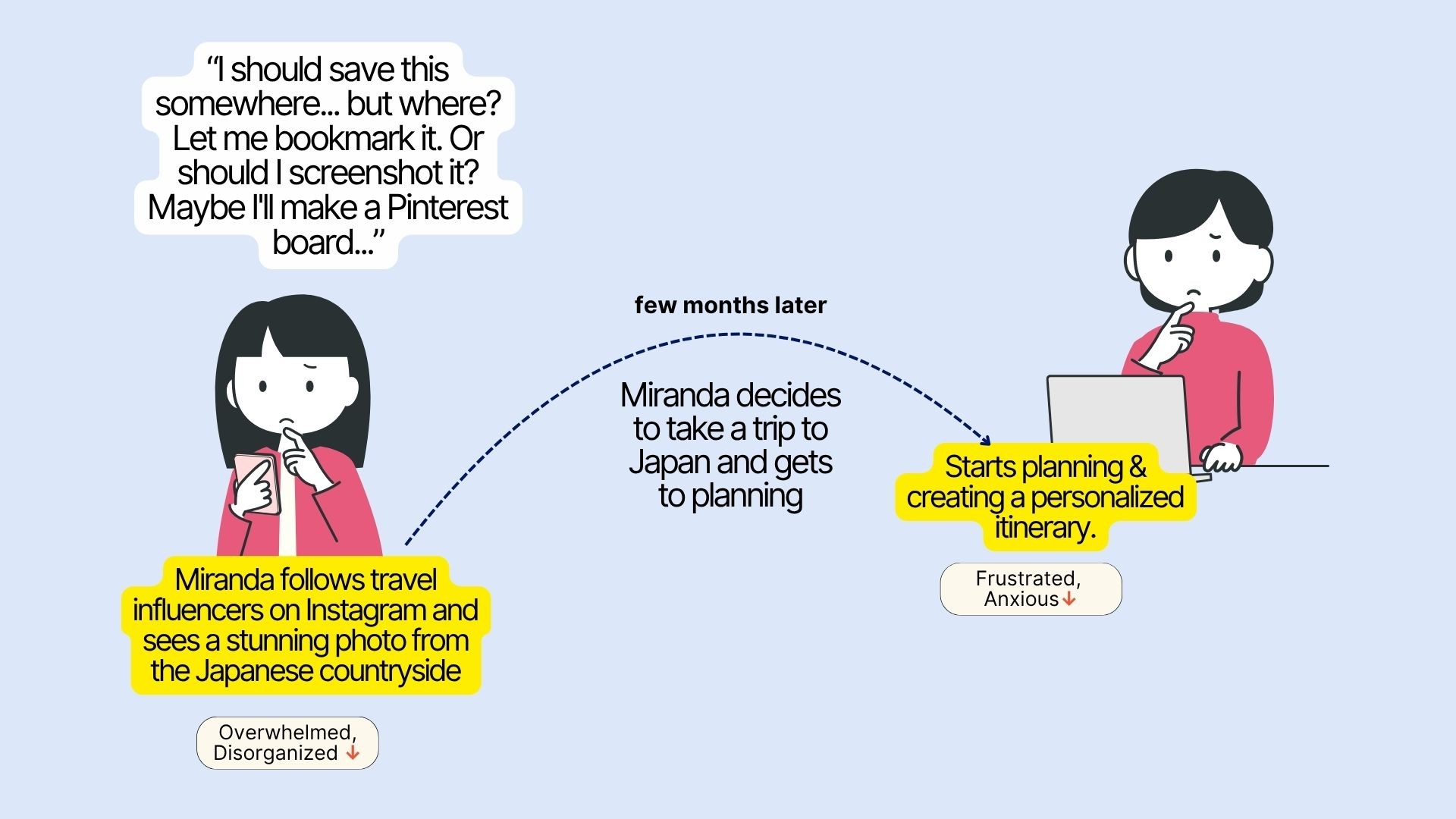
By targeting this specific problem, we found an opportunity to create a seamless experience where users can save, organize, and access travel inspirations directly from social media, ensuring they never lose track of their favorite ideas.
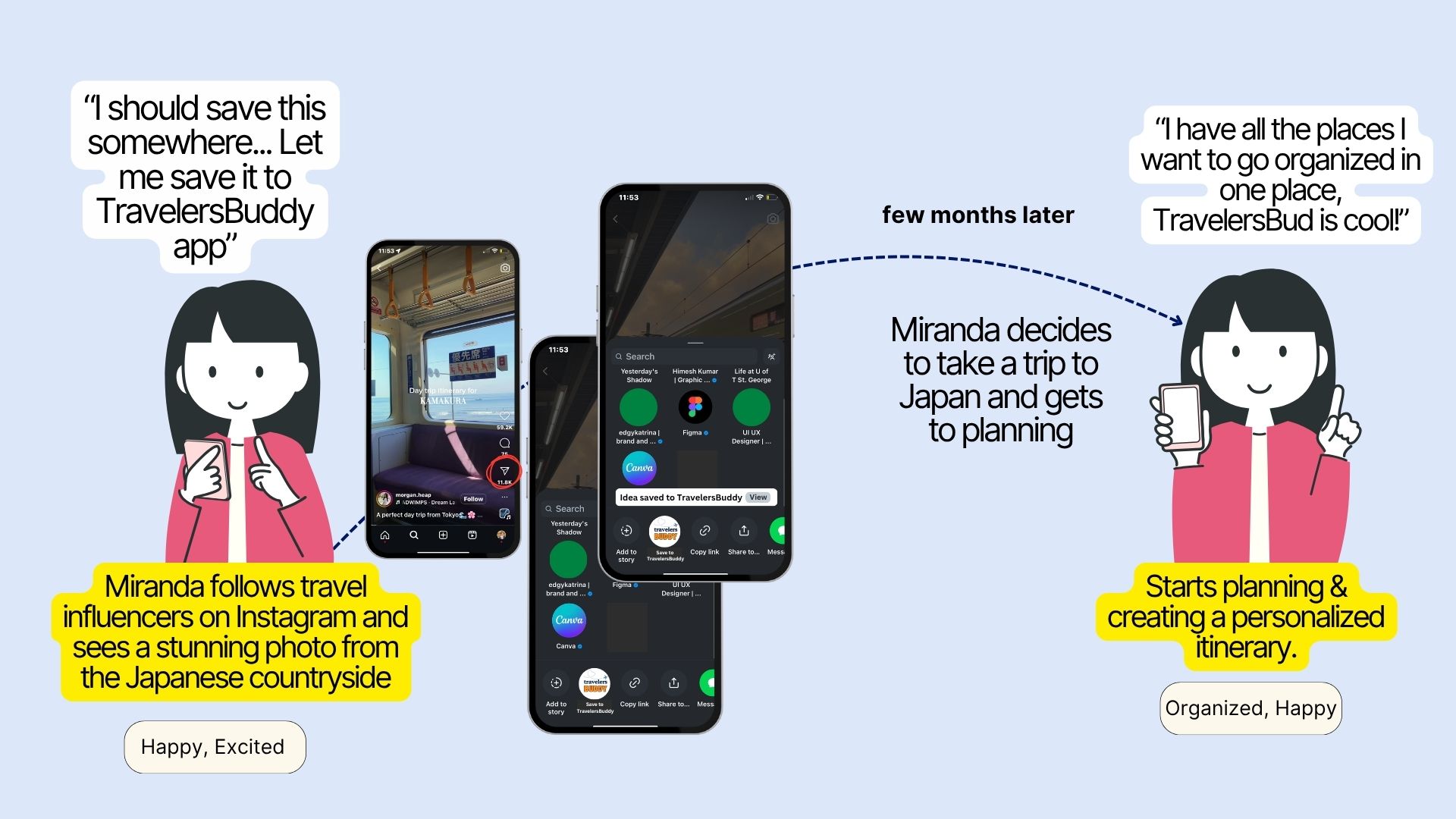
Conducting interviews and diving into user insights made me realize how much I enjoy understanding people's needs, frustrations, and behaviors. User research became my favorite part of the process!
During an exciting ideation activity, I discovered that I could dream up bold, unconventional solutions in just four minutes. This fast-paced creativity helped me embrace the power of rapid problem-solving.
I was happy to be recognized as the best presenter by our TA, which gave me the confidence to believe in my ability to communicate design solutions effectively.
From discovery to final presentation, I loved every step of the UX process. This project reinforced my decision to transition from software development to UX—I'm on the right path, and I can't wait to keep growing in this field!
During my 8-month internship with Brightly (a Siemens company), I led the end-to-end design of a critical sustainability platform integration while balancing dual responsibilities as both UX Designer and Product Owner.
Working alongside managers and team leads who championed ownership and autonomy, I conducted user research that influenced organizational-level decisions and delivered features now used by Sustainability Managers, Implementation Partners, and Building Managers across North America.
Our Greenway had outgrown its own website — and it was costing them funders, partners, and community members before a single conversation could begin.
An evidence-based IA redesign proposal with restructured navigation, a dedicated Events pathway, a consolidated research hub, and improved cross-site trust signals — grounded in usability testing, card sorting, stakeholder interviews, and a full content audit.
Our Greenway gave us a clear brief: the website needed to grow with the organization. With that direction, we ran four research methods to understand where the website was falling short and for whom.
Our primary research included 8 sessions across two groups:
Six participants ranging from long-time community members to first-time visitors, completed task-based usability tests, navigating the live site while thinking aloud, and an open card sort.
Two organizational leads (the Treasurer and Operations Manager) shared the gap between how the organization saw itself and how the website represented it.
All findings were analyzed through affinity mapping and triangulated across methods to surface patterns. Here's what emerged:
Users arrived knowing what they wanted like events, research, and ways to donate, but the site's structure consistently sent them in the wrong direction.
The website still spoke the language of a single-corridor initiative. For funders, partners, and citywide community members, that mismatch quietly questioned credibility.
Being redirected to an unknown third-party portal mid-donation doesn't just create friction, but it triggers doubt.
A website that's hard to navigate signals disorganization and for Our Greenway to attract funders and community members alike, the experience needed to feel as polished and intentional as the work behind it.
Three very different people were arriving at the same website — and leaving without what they came for.
I did not understand the website. It is complicated to navigate — there's no clear mission, vision, or experience of what we have done.
- Internal Stakeholders
When I go to this page, it shows York University — it might make me feel it's "a phishing website.
- UT1 (While completing a donation related task)
It's unfortunate that events doesn't have its own tab.
- UT3 (while after completing the task to find an event
To expand on our thought process, we utilized "the crazy 8" exercises to extract the ideas that had been forming in our heads since the research phase. Our brainstorming session entailed 5-minute intervals of 8 sketches. I did not compose eight sketches, but this exercise forced me to push out ideas. This was a great exercise to get my ideas on paper.
After this exercise, we transferred our ideas to stickies and prioritized our features to finalize our final features.
Shortlisted places and trip ideas from different social media will be automatically organized into curated folders in the wishlist.
Share the trip plan with your travel buddies for better collaboration.
When planning a trip to a certain place, the app will automatically pull applicable wishlist items into itineraries, eliminating the task of cross-referencing.
Generate personalized Itinerary using user preferences.
We finalized our key user screens (wishlist, profile, explore etc.) and sketched at least two options for each screen. Once every team member had sketched at least 2 options, our team met again to discuss our UI sketches.
We then picked the best parts from our designs, keeping in mind our users.
The next step was the creation of lo-fi wireframes and creating a prototype for user testing. We as a team had decided on a usability script and the task we would ask to be carried out.
I gained some really useful insights by observing the participants and the way they complete a task.
The brand color palette balances energy, tranquility, and is WCAG 2.0 level AA. Vibrant orange brings dynamic energy to key interaction points, particularly the call-to-action buttons like "Plan Trip," while a subtle, lighter background creates visual harmony.
The typography emphasizes clean, straightforward fonts that prioritize readability, ensuring users can easily navigate their journey from start to finish.
While we initially highlighted curated folders as a key feature, we felt this wasn’t a strong enough differentiator. Determined to address this, I took it upon myself to identify another unique aspect that could set our app apart.
Through user interviews, we uncovered an interesting insight: social media plays a major role in travel planning. 6 out of 10 participants mentioned social media as a key influence in their decision-making process. However, we also identified a major pain point: users struggle to save and revisit travel ideas they discover on platforms like Instagram and TikTok. Once they like a post, it often gets lost in their feed, making it difficult to refer back to when they start planning their trip.
By targeting this specific problem, we found an opportunity to create a seamless experience where users can save, organize, and access travel inspirations directly from social media, ensuring they never lose track of their favorite ideas.
Conducting interviews and diving into user insights made me realize how much I enjoy understanding people's needs, frustrations, and behaviors. User research became my favorite part of the process!
During an exciting ideation activity, I discovered that I could dream up bold, unconventional solutions in just four minutes. This fast-paced creativity helped me embrace the power of rapid problem-solving.
I was happy to be recognized as the best presenter by our TA, which gave me the confidence to believe in my ability to communicate design solutions effectively.
From discovery to final presentation, I loved every step of the UX process. This project reinforced my decision to transition from software development to UX—I'm on the right path, and I can't wait to keep growing in this field!
During my 8-month internship with Brightly (a Siemens company), I led the end-to-end design of a critical sustainability platform integration while balancing dual responsibilities as both UX Designer and Product Owner.
Working alongside managers and team leads who championed ownership and autonomy, I conducted user research that influenced organizational-level decisions and delivered features now used by Sustainability Managers, Implementation Partners, and Building Managers across North America.
Our Greenway had outgrown its own website — and it was costing them funders, partners, and community members before a single conversation could begin.
An evidence-based IA redesign proposal with restructured navigation, a dedicated Events pathway, a consolidated research hub, and improved cross-site trust signals — grounded in usability testing, card sorting, stakeholder interviews, and a full content audit.
Our Greenway gave us a clear brief: the website needed to grow with the organization. With that direction, we ran four research methods to understand where the website was falling short and for whom.
Our primary research included 8 sessions across two groups:
Six participants ranging from long-time community members to first-time visitors, completed task-based usability tests, navigating the live site while thinking aloud, and an open card sort.
Two organizational leads (the Treasurer and Operations Manager) shared the gap between how the organization saw itself and how the website represented it.
All findings were analyzed through affinity mapping and triangulated across methods to surface patterns. Here's what emerged:
Users arrived knowing what they wanted like events, research, and ways to donate, but the site's structure consistently sent them in the wrong direction.
The website still spoke the language of a single-corridor initiative. For funders, partners, and citywide community members, that mismatch quietly questioned credibility.
Being redirected to an unknown third-party portal mid-donation doesn't just create friction, but it triggers doubt.
A website that's hard to navigate signals disorganization and for Our Greenway to attract funders and community members alike, the experience needed to feel as polished and intentional as the work behind it.
Three very different people were arriving at the same website — and leaving without what they came for.
I did not understand the website. It is complicated to navigate — there's no clear mission, vision, or experience of what we have done.
- Internal Stakeholders
When I go to this page, it shows York University — it might make me feel it's "a phishing website.
- UT1 (While completing a donation related task)
It's unfortunate that events doesn't have its own tab.
- UT3 (while after completing the task to find an event
To expand on our thought process, we utilized "the crazy 8" exercises to extract the ideas that had been forming in our heads since the research phase. Our brainstorming session entailed 5-minute intervals of 8 sketches. I did not compose eight sketches, but this exercise forced me to push out ideas. This was a great exercise to get my ideas on paper.
After this exercise, we transferred our ideas to stickies and prioritized our features to finalize our final features.
Shortlisted places and trip ideas from different social media will be automatically organized into curated folders in the wishlist.
Share the trip plan with your travel buddies for better collaboration.
When planning a trip to a certain place, the app will automatically pull applicable wishlist items into itineraries, eliminating the task of cross-referencing.
Generate personalized Itinerary using user preferences.
We finalized our key user screens (wishlist, profile, explore etc.) and sketched at least two options for each screen. Once every team member had sketched at least 2 options, our team met again to discuss our UI sketches.
We then picked the best parts from our designs, keeping in mind our users.
The next step was the creation of lo-fi wireframes and creating a prototype for user testing. We as a team had decided on a usability script and the task we would ask to be carried out.
I gained some really useful insights by observing the participants and the way they complete a task.
The brand color palette balances energy, tranquility, and is WCAG 2.0 level AA. Vibrant orange brings dynamic energy to key interaction points, particularly the call-to-action buttons like "Plan Trip," while a subtle, lighter background creates visual harmony.
The typography emphasizes clean, straightforward fonts that prioritize readability, ensuring users can easily navigate their journey from start to finish.
While we initially highlighted curated folders as a key feature, we felt this wasn’t a strong enough differentiator. Determined to address this, I took it upon myself to identify another unique aspect that could set our app apart.
Through user interviews, we uncovered an interesting insight: social media plays a major role in travel planning. 6 out of 10 participants mentioned social media as a key influence in their decision-making process. However, we also identified a major pain point: users struggle to save and revisit travel ideas they discover on platforms like Instagram and TikTok. Once they like a post, it often gets lost in their feed, making it difficult to refer back to when they start planning their trip.
By targeting this specific problem, we found an opportunity to create a seamless experience where users can save, organize, and access travel inspirations directly from social media, ensuring they never lose track of their favorite ideas.
Conducting interviews and diving into user insights made me realize how much I enjoy understanding people's needs, frustrations, and behaviors. User research became my favorite part of the process!
During an exciting ideation activity, I discovered that I could dream up bold, unconventional solutions in just four minutes. This fast-paced creativity helped me embrace the power of rapid problem-solving.
I was happy to be recognized as the best presenter by our TA, which gave me the confidence to believe in my ability to communicate design solutions effectively.
From discovery to final presentation, I loved every step of the UX process. This project reinforced my decision to transition from software development to UX—I'm on the right path, and I can't wait to keep growing in this field!
Got thoughts on design, or want to swap Spotify playlists over chai?
Got thoughts on design, or want to swap Spotify playlists over chai?
Got thoughts on design, or want to swap Spotify playlists over chai?