OurGreenway Website

information architecture โ€ข ux research โ€ข wcag guidelines โ€ข developer handoffs

Our Greenway is a Toronto non-profit building sustainable mobility infrastructure across the city. Their website was organized around how the organization thought about its work, not how users tried to find it. Community members couldn't locate the event registration. Donors hit an unexplained redirect and bounced. Programs were buried two clicks deep inside a dropdown that listed everything at once.

We restructured the site from the ground up, grounded in five research methods.

Timeline

10 Weeks

my role

Led UX research, accessibility audits, and information architecture redesign.

Led UX research, accessibility audits, and information architecture redesign.

Team

3 other UX design students

3 other UX design students

tools

Figma, UXTweak, ScreamingFrog
The Challenge

โ€œThe website is not attracting people who want to invest in us.โ€

โ€œThe bigger priority is to help people find information easily and help them learn about the organization.โ€

Front page still reflects an old focus (Northwest Toronto), which no longer matches their actual scope.

Word from the stakeholders

The organization had grown citywide. The website hadn't.

Our Greenway started as a Northwest Toronto LRT advocacy group. By 2026, it was running international conferences, publishing mobility research, and operating community programs across Toronto. The website still introduced the organization as a neighbourhood initiative, and its navigation still reflected the priorities of 2019.

01
Programs were buried and hard to find

Active programs like Cycling Without Age sat two clicks deep inside "Our Work," a dropdown that listed all 10 sub-items at once, creating a wall of text before any real navigation happened.

02
"Events" had no home on the website

There was no Events section. Ride registration, conference info, and community programming were fragmented across individual program pages with no clear path to sign up.

03
Donating felt like hitting an error

The donate button redirected to York University with no explanation. Multiple usability participants assumed they'd broken something and abandoned the flow.

04
Research work was invisible

10+ reports and publications were buried inside the "Our Work" dropdown โ€” no dedicated hub, no filtering, no way to browse. The content existed; users just couldn't reach it.

original homepage of the website

The Research

Five methods, each answering a different question

We ran five methods because each one could answer something the others couldn't.

Competitive Analysis

Deep comparison against Evergreen (client-specified) and WindReach โ€” Canadian non-profits with comparable multi-program, multi-audience sites.

Content Audit

ScreamingFrog technical crawl plus manual WCAG 2.1 review. 19 issues surfaced across four priority levels โ€” 3 of them critical.

Desk Research

Full map of navigation structure, page hierarchy, labeling consistency, click depth, and cross-linking gaps.

Stakeholder Interviews ยท 3


Teams calls with the Treasurer (SI1), Operations Coordinator (SI2), and CEO (SI3). Our goal was to understand organizational constraints before writing a single recommendation.

Open Card Sort ยท 5 Participants

18 real content cards on UXtweak. Participants freely grouped and named their own categories โ€” revealing how they actually organized the content, without being led by existing nav labels.

Usability Testing ยท 6 Participants

Task-based sessions on the live site. We recruited independently rather than accepting the client's offer to supply participants from their own contact list.

What the card sort told us

I observed that the users weren't cruising through the sort. They were working hard to figure out what each card meant. That cognitive effort is a direct symptom of content labels that don't communicate.

The clustering result, though, was unambiguous. Without any prompting, all five participants divided 18 content cards into exactly two groups, and never crossed between them. Cards within each cluster scored 80โ€“100% similarity. Cross-cluster pairs: 0%

Cluster A โ€” 100% agreement

Who we are & how to help

Our Plan ยท Our Team ยท Our Supporters ยท Contact Us ยท Join Us ยท Donate ยท Sign up for updates ยท Social Media

Users named these: "Who we are," "How to help us," "Actions"

Cluster B โ€” 80โ€“100% agreement

Programs, research & impact

Cycling Without Age ยท NACBC ยท Flightpath ยท The Greenway Effect ยท Micromobility ยท Dispatches ยท E-Cargo Roadshow

Named: "Research/Products," "Impacts" โ€” or left unnamed entirely
What Usability Tests added

The usability test confirmed that the participants struggled most with two tasks.

  1. Finding event registration โ€” It didn't have a coherent destination anywhere on the site.

  2. Completing a donation โ€” The York University redirect, appearing without context, caused visible confusion. Several participants paused, read the URL bar, looked uncertain, and in two cases started to close the tab before continuing.

I did not understand the website. It is complicated to navigate โ€” there's no clear mission, vision, or experience of what we have done.

- Internal Stakeholders

When I go to this page, it shows York University โ€” it might make me feel it's "a phishing website.

- UT1 (While completing a donation related task)

It's unfortunate that events doesn't have its own tab.

- UT3 (while after completing the task to find an event)

words from Usability Test Participant

What participants responded to positively was the colorful illustrations and organized content blocks on the homepage. This led us to conclude that

the problem wasn't the design but the structure.

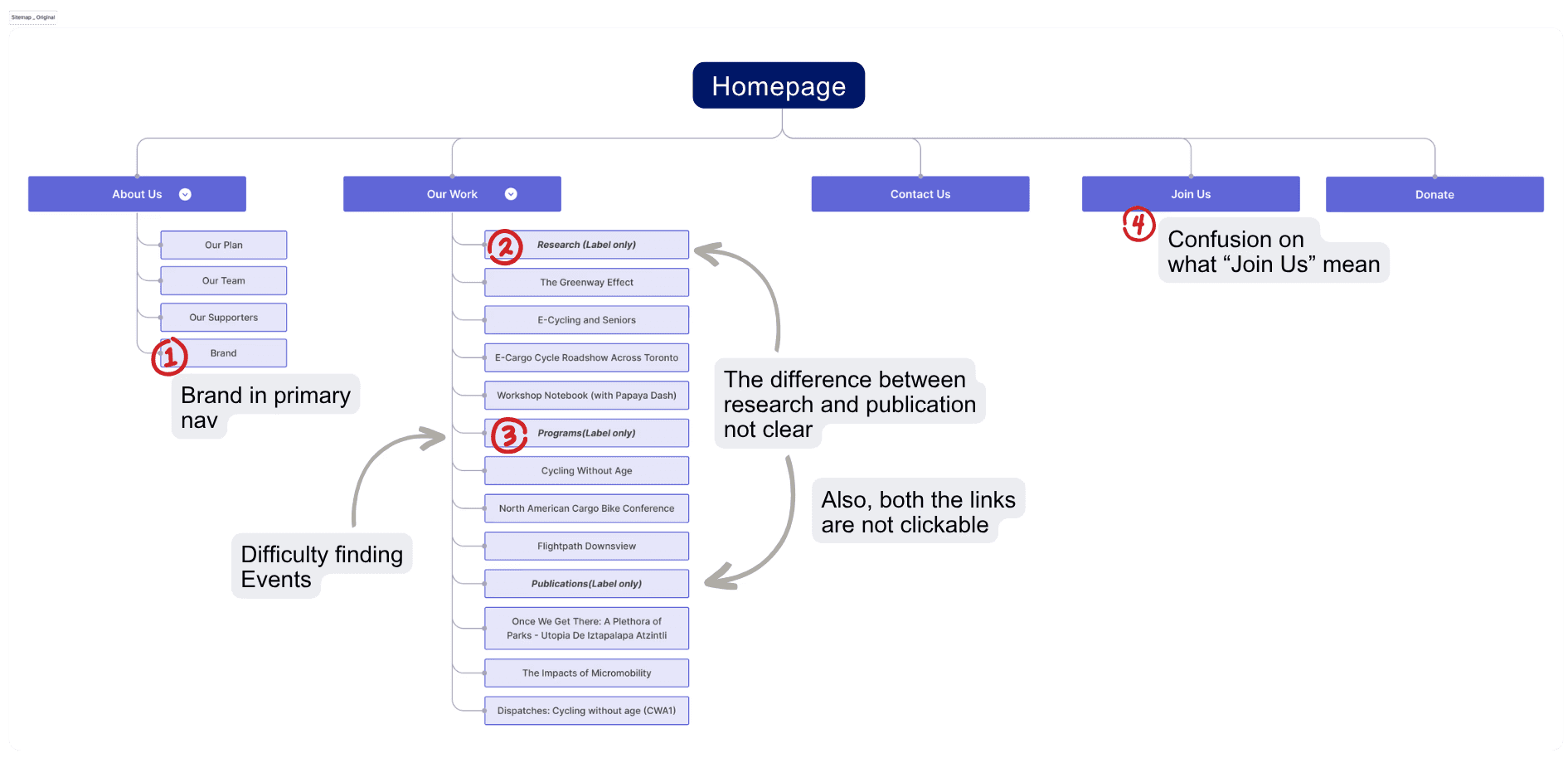
Problems identified in the current IA during usability tests

Design Decisions

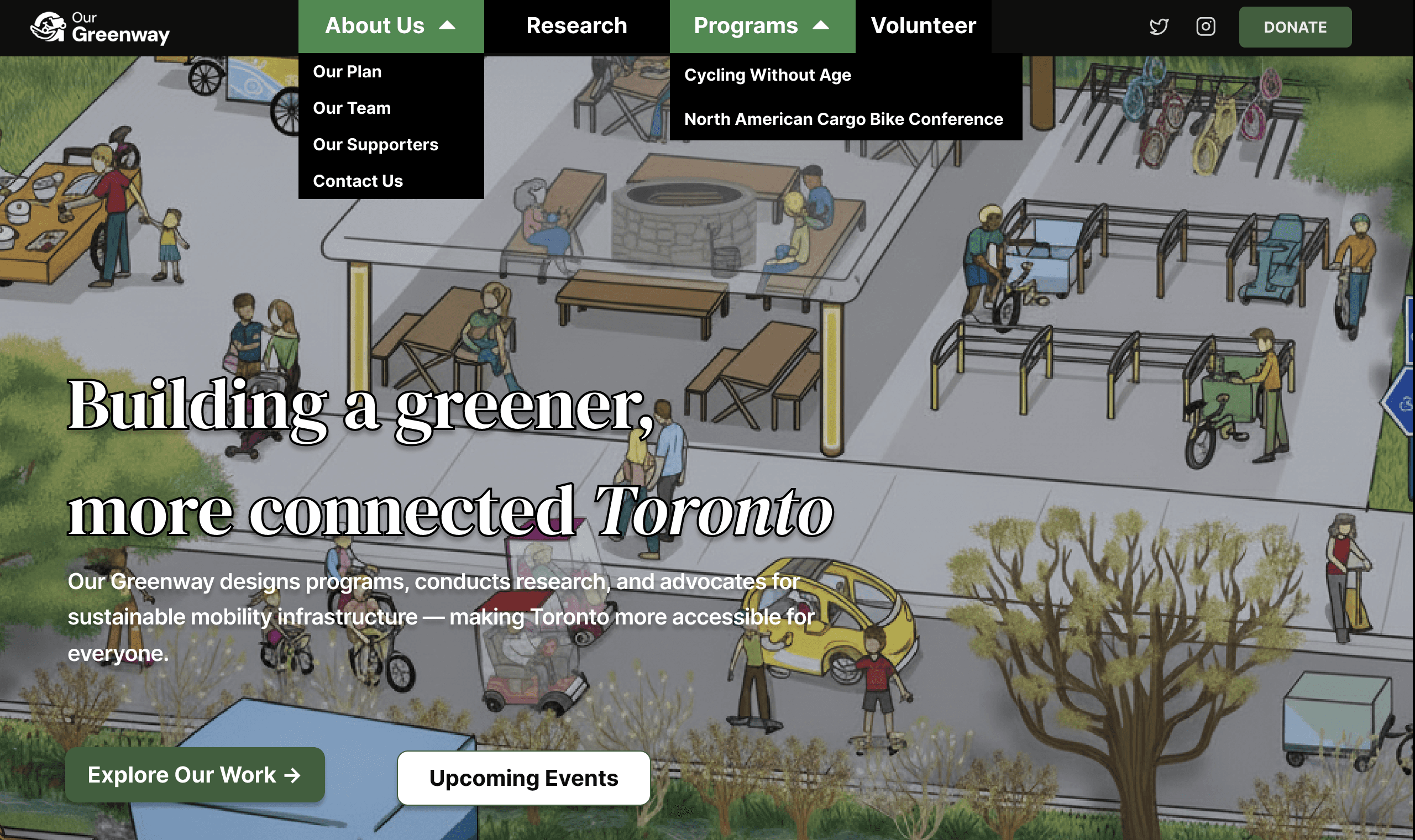
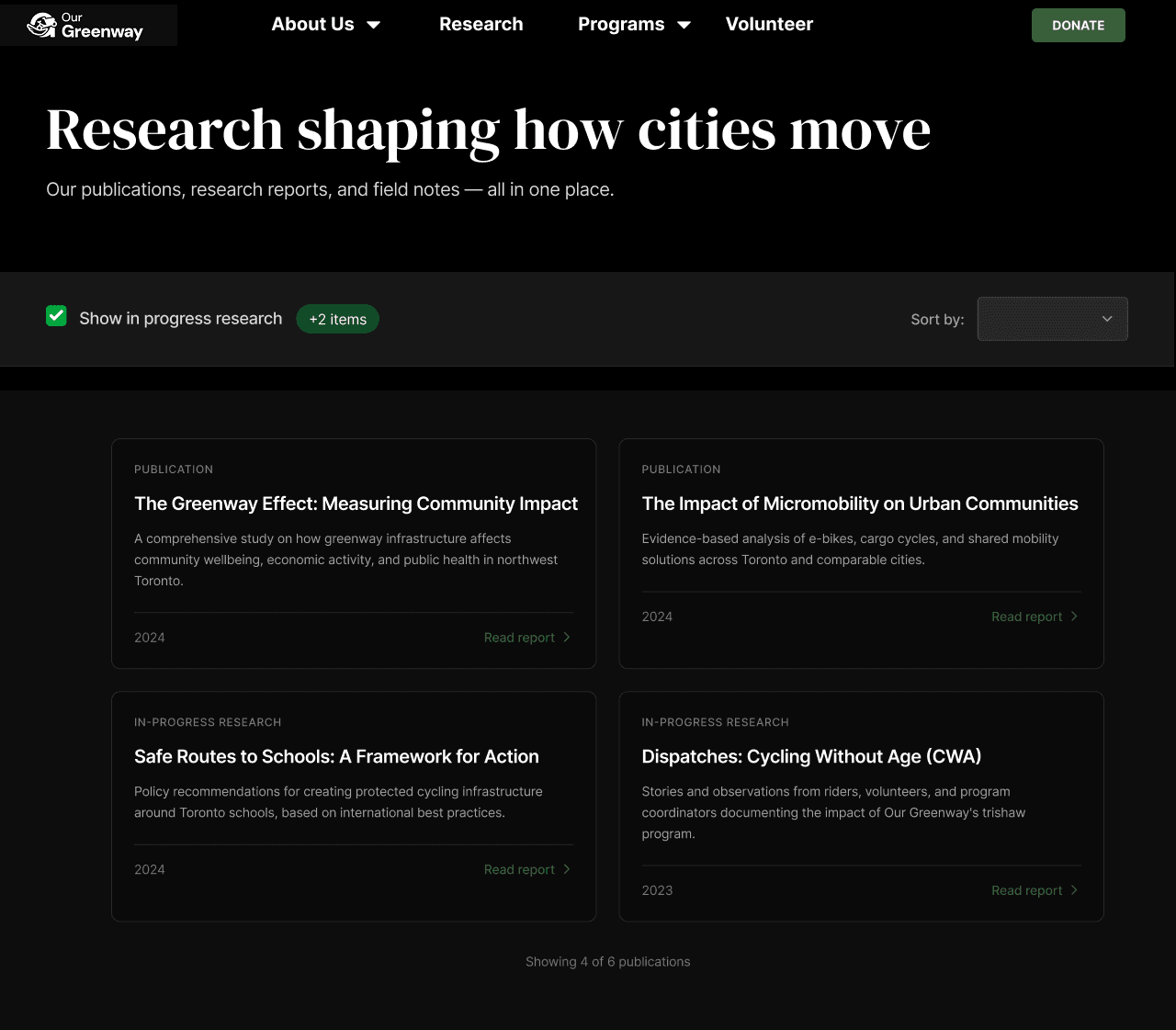
  1. Restructured the navigation
  • No Events tab.

    4/6 usability participants couldn't locate event registration easily.

  • "Our Work" was overloaded - it holds programs, publications, and research.

  • Participants were unsure whether "Join Us" meant events, membership, volunteering, or donating.

  • Removed "Brand" from the public navigation

after
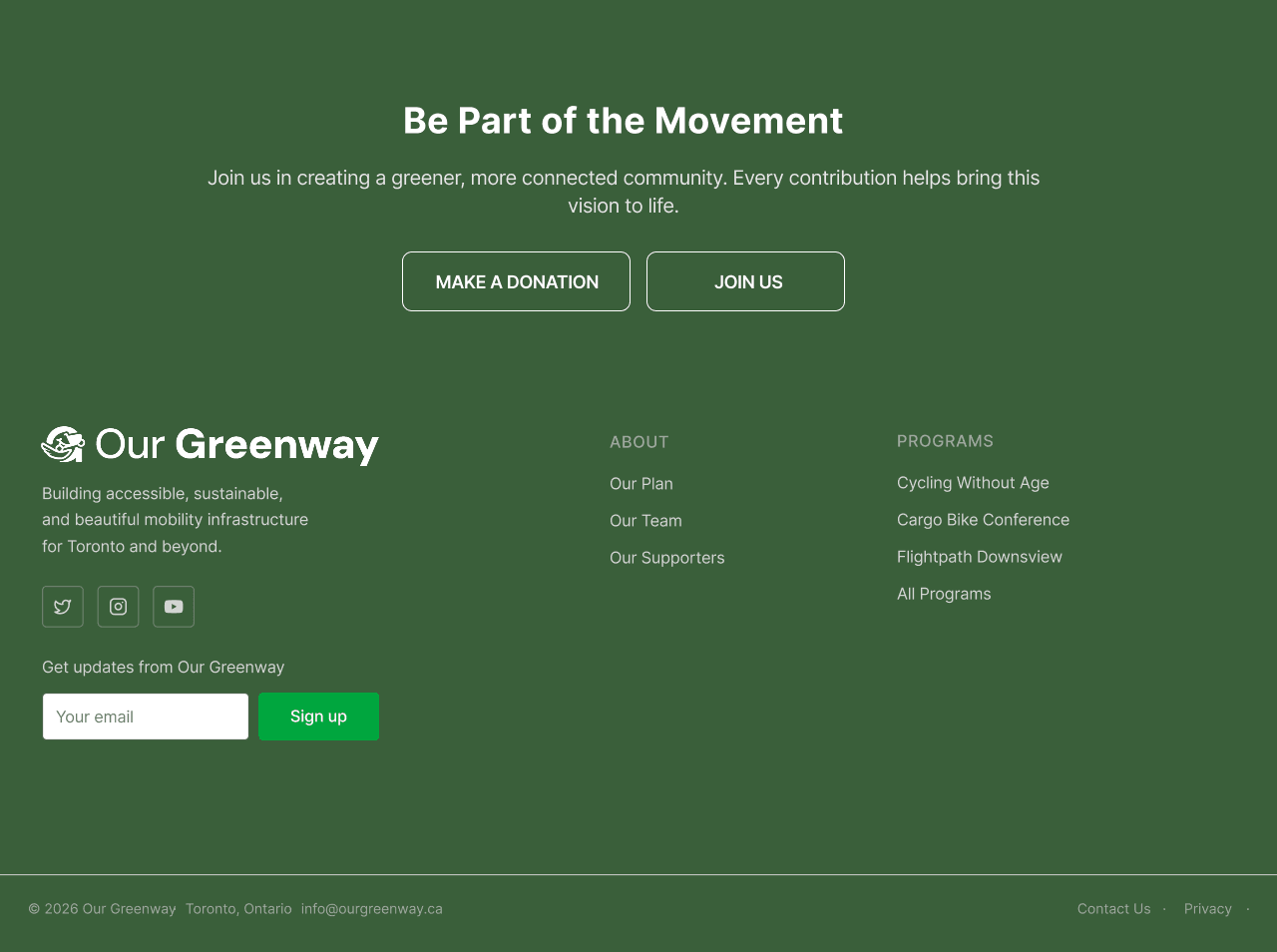
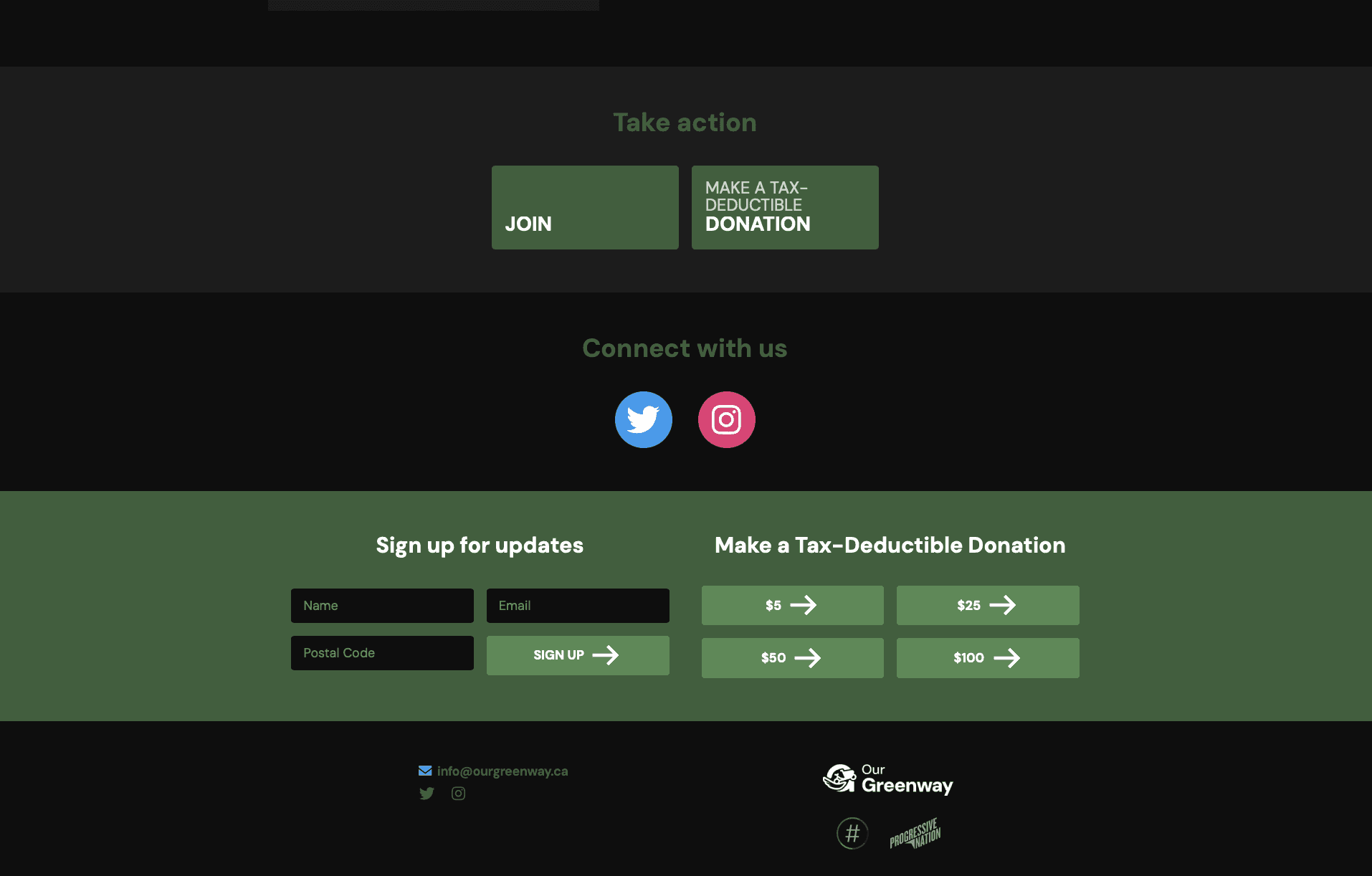
  1. A renewed Footer for better Navigation
BEFORE

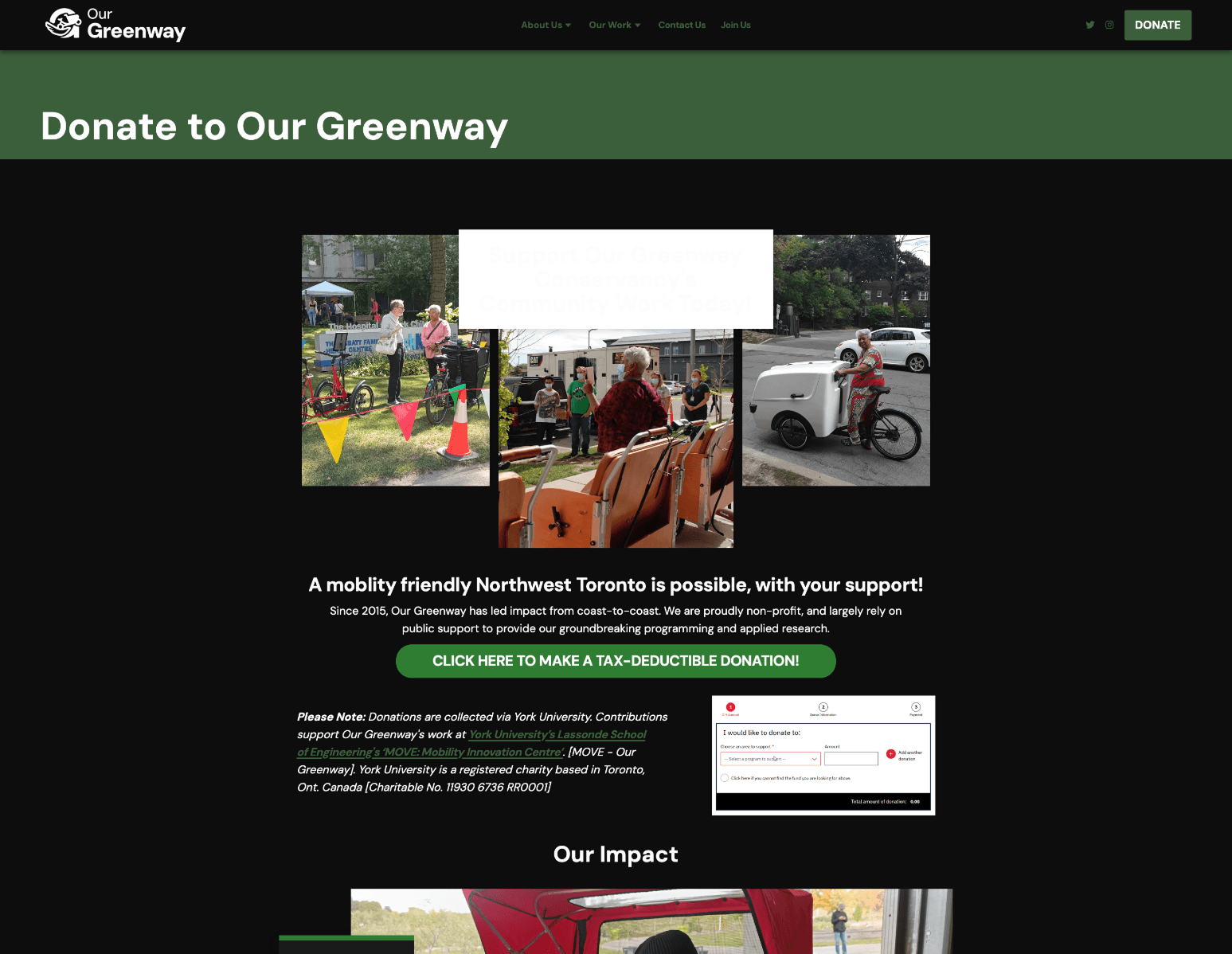
Usability testing showed the York University redirect caused visible confusion and abandonment. The obvious recommendation was "fix the redirect." But the stakeholder interview revealed that York University is Our Greenway's primary research partner and processes donations as a registered Canadian charity, changing the infrastructure would require renegotiating a core organizational partnership.

So the recommendation changed: rather than fixing the redirect, explain it before it happens. A short note on the donate page โ€” naming York University, describing the relationship, and confirming the redirect is intentional โ€” resolves the confusion without touching infrastructure.

after
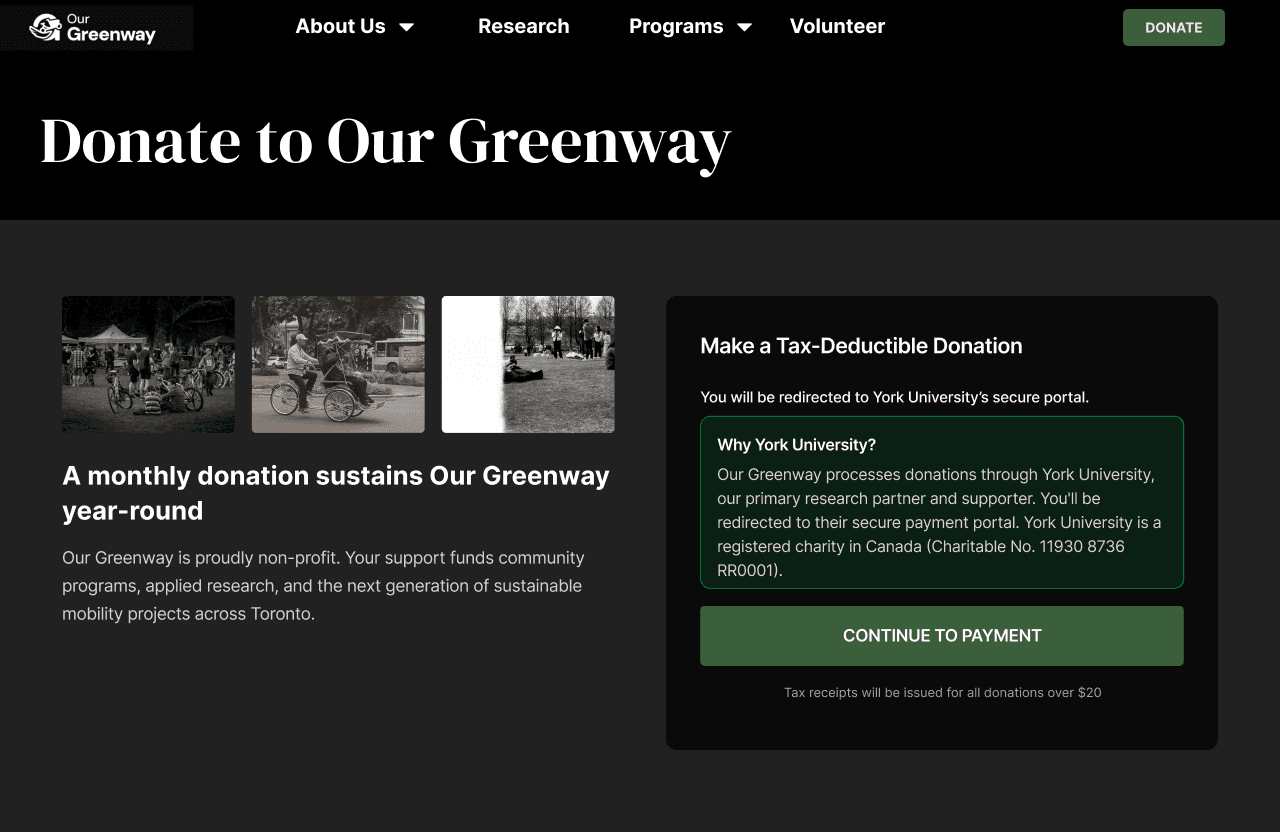
  1. Explained the York University donation redirect

Usability testing showed the York University redirect caused visible confusion and abandonment. The obvious recommendation was "fix the redirect." But the stakeholder interview revealed that York University is Our Greenway's primary research partner and processes donations as a registered Canadian charity, changing the infrastructure would require renegotiating a core organizational partnership.

So the recommendation changed: rather than fixing the redirect, explain it before it happens. A short note on the donate page โ€” naming York University, describing the relationship, and confirming the redirect is intentional โ€” resolves the confusion without touching infrastructure.

BEFORE
after

Learnings

On participant recruitment

The organization naturally wanted to hear from people who already engaged with their work. But "people who already know the site" is not the same as "people who need to find their way around the site." Pushing back on the client's offer to supply usability participants was the right call, the navigation failures we found would have been invisible to a familiar audience.

Define success criteria before execution, not after

The SMART criteria we agreed with the client at the end of discovery gave the execution phase something to design toward โ€” and give the post-launch evaluation something to measure against. Without a baseline and a target, there's no way to know if the redesign actually worked.

What worked

Running stakeholder interviews before writing recommendations. The York University donation flow looked like broken UX from the outside. The interviews revealed it as an organizational constraint, which meant the right solution was a content fix, not a technical one. That shift only happens when you understand the constraint first.

What I'd do differently

Recruit more age-diverse usability participants earlier. Testing with a younger-skewing recruited sample meant we caught navigation failures but may have missed accessibility barriers that surface specifically with older users and assistive technology. Documenting this limitation is honest; it would have been better to design around it.

Pictured: Presenting my UX project with the same energy as a TED Talk speaker. ๐Ÿ˜Ž

The Challenge

โ€œThe website is not attracting people who want to invest in us.โ€

โ€œThe bigger priority is to help people find information easily and help them learn about the organization.โ€

Front page still reflects an old focus (Northwest Toronto), which no longer matches their actual scope.

Word from the stakeholders

The organization had grown citywide. The website hadn't.

Our Greenway started as a Northwest Toronto LRT advocacy group. By 2026, it was running international conferences, publishing mobility research, and operating community programs across Toronto. The website still introduced the organization as a neighbourhood initiative, and its navigation still reflected the priorities of 2019.

01
Programs were buried and hard to find

Active programs like Cycling Without Age sat two clicks deep inside "Our Work," a dropdown that listed all 10 sub-items at once, creating a wall of text before any real navigation happened.

02
"Events" had no home on the website

There was no Events section. Ride registration, conference info, and community programming were fragmented across individual program pages with no clear path to sign up.

03
Donating felt like hitting an error

The donate button redirected to York University with no explanation. Multiple usability participants assumed they'd broken something and abandoned the flow.

04
Research work was invisible

10+ reports and publications were buried inside the "Our Work" dropdown โ€” no dedicated hub, no filtering, no way to browse. The content existed; users just couldn't reach it.

original homepage of the website

The Research

Five methods, each answering a different question

We ran five methods because each one could answer something the others couldn't.

Competitive Analysis

Deep comparison against Evergreen (client-specified) and WindReach โ€” Canadian non-profits with comparable multi-program, multi-audience sites.

Content Audit

ScreamingFrog technical crawl plus manual WCAG 2.1 review. 19 issues surfaced across four priority levels โ€” 3 of them critical.

Desk Research

Full map of navigation structure, page hierarchy, labeling consistency, click depth, and cross-linking gaps.

Stakeholder Interviews ยท 3


Teams calls with the Treasurer (SI1), Operations Coordinator (SI2), and CEO (SI3). Our goal was to understand organizational constraints before writing a single recommendation.

Open Card Sort ยท 5 Participants

18 real content cards on UXtweak. Participants freely grouped and named their own categories โ€” revealing how they actually organized the content, without being led by existing nav labels.

Usability Testing ยท 6 Participants

Task-based sessions on the live site. We recruited independently rather than accepting the client's offer to supply participants from their own contact list.

What the card sort told us

I observed that the users weren't cruising through the sort. They were working hard to figure out what each card meant. That cognitive effort is a direct symptom of content labels that don't communicate.

The clustering result, though, was unambiguous. Without any prompting, all five participants divided 18 content cards into exactly two groups, and never crossed between them. Cards within each cluster scored 80โ€“100% similarity. Cross-cluster pairs: 0%

Cluster A โ€” 100% agreement

Who we are & how to help

Our Plan ยท Our Team ยท Our Supporters ยท Contact Us ยท Join Us ยท Donate ยท Sign up for updates ยท Social Media

Users named these: "Who we are," "How to help us," "Actions"

Cluster B โ€” 80โ€“100% agreement

Programs, research & impact

Cycling Without Age ยท NACBC ยท Flightpath ยท The Greenway Effect ยท Micromobility ยท Dispatches ยท E-Cargo Roadshow

Named: "Research/Products," "Impacts" โ€” or left unnamed entirely
What Usability Tests added

The usability test confirmed that the participants struggled most with two tasks.

  1. Finding event registration โ€” It didn't have a coherent destination anywhere on the site.

  2. Completing a donation โ€” The York University redirect, appearing without context, caused visible confusion. Several participants paused, read the URL bar, looked uncertain, and in two cases started to close the tab before continuing.

I did not understand the website. It is complicated to navigate โ€” there's no clear mission, vision, or experience of what we have done.

- Internal Stakeholders

When I go to this page, it shows York University โ€” it might make me feel it's "a phishing website.

- UT1 (While completing a donation related task)

It's unfortunate that events doesn't have its own tab.

- UT3 (while after completing the task to find an event)

words from Usability Test Participant

What participants responded to positively was the colorful illustrations and organized content blocks on the homepage. This led us to conclude that

the problem wasn't the design but the structure.

Problems identified in the current IA during usability tests

Design Decisions

  1. Restructured the navigation
  • No Events tab.

    4/6 usability participants couldn't locate event registration easily.

  • "Our Work" was overloaded - it holds programs, publications, and research.

  • Participants were unsure whether "Join Us" meant events, membership, volunteering, or donating.

  • Removed "Brand" from the public navigation

after
  1. A renewed Footer for better Navigation
BEFORE

Usability testing showed the York University redirect caused visible confusion and abandonment. The obvious recommendation was "fix the redirect." But the stakeholder interview revealed that York University is Our Greenway's primary research partner and processes donations as a registered Canadian charity, changing the infrastructure would require renegotiating a core organizational partnership.

So the recommendation changed: rather than fixing the redirect, explain it before it happens. A short note on the donate page โ€” naming York University, describing the relationship, and confirming the redirect is intentional โ€” resolves the confusion without touching infrastructure.

after
  1. Explained the York University donation redirect

Usability testing showed the York University redirect caused visible confusion and abandonment. The obvious recommendation was "fix the redirect." But the stakeholder interview revealed that York University is Our Greenway's primary research partner and processes donations as a registered Canadian charity, changing the infrastructure would require renegotiating a core organizational partnership.

So the recommendation changed: rather than fixing the redirect, explain it before it happens. A short note on the donate page โ€” naming York University, describing the relationship, and confirming the redirect is intentional โ€” resolves the confusion without touching infrastructure.

BEFORE
after

Learnings

On participant recruitment

The organization naturally wanted to hear from people who already engaged with their work. But "people who already know the site" is not the same as "people who need to find their way around the site." Pushing back on the client's offer to supply usability participants was the right call, the navigation failures we found would have been invisible to a familiar audience.

Define success criteria before execution, not after

The SMART criteria we agreed with the client at the end of discovery gave the execution phase something to design toward โ€” and give the post-launch evaluation something to measure against. Without a baseline and a target, there's no way to know if the redesign actually worked.

What worked

Running stakeholder interviews before writing recommendations. The York University donation flow looked like broken UX from the outside. The interviews revealed it as an organizational constraint, which meant the right solution was a content fix, not a technical one. That shift only happens when you understand the constraint first.

What I'd do differently

Recruit more age-diverse usability participants earlier. Testing with a younger-skewing recruited sample meant we caught navigation failures but may have missed accessibility barriers that surface specifically with older users and assistive technology. Documenting this limitation is honest; it would have been better to design around it.

Pictured: Presenting my UX project with the same energy as a TED Talk speaker. ๐Ÿ˜Ž

The Challenge

โ€œThe website is not attracting people who want to invest in us.โ€

โ€œThe bigger priority is to help people find information easily and help them learn about the organization.โ€

Front page still reflects an old focus (Northwest Toronto), which no longer matches their actual scope.

Word from the stakeholders

The organization had grown citywide. The website hadn't.

Our Greenway started as a Northwest Toronto LRT advocacy group. By 2026, it was running international conferences, publishing mobility research, and operating community programs across Toronto. The website still introduced the organization as a neighbourhood initiative, and its navigation still reflected the priorities of 2019.

01
Programs were buried and hard to find

Active programs like Cycling Without Age sat two clicks deep inside "Our Work," a dropdown that listed all 10 sub-items at once, creating a wall of text before any real navigation happened.

02
"Events" had no home on the website

There was no Events section. Ride registration, conference info, and community programming were fragmented across individual program pages with no clear path to sign up.

03
Donating felt like hitting an error

The donate button redirected to York University with no explanation. Multiple usability participants assumed they'd broken something and abandoned the flow.

04
Research work was invisible

10+ reports and publications were buried inside the "Our Work" dropdown โ€” no dedicated hub, no filtering, no way to browse. The content existed; users just couldn't reach it.

original homepage of the website

The Research

Five methods, each answering a different question

We ran five methods because each one could answer something the others couldn't.

Competitive Analysis

Deep comparison against Evergreen (client-specified) and WindReach โ€” Canadian non-profits with comparable multi-program, multi-audience sites.

Content Audit

ScreamingFrog technical crawl plus manual WCAG 2.1 review. 19 issues surfaced across four priority levels โ€” 3 of them critical.

Desk Research

Full map of navigation structure, page hierarchy, labeling consistency, click depth, and cross-linking gaps.

Stakeholder Interviews ยท 3


Teams calls with the Treasurer (SI1), Operations Coordinator (SI2), and CEO (SI3). Our goal was to understand organizational constraints before writing a single recommendation.

Open Card Sort ยท 5 Participants

18 real content cards on UXtweak. Participants freely grouped and named their own categories โ€” revealing how they actually organized the content, without being led by existing nav labels.

Usability Testing ยท 6 Participants

Task-based sessions on the live site. We recruited independently rather than accepting the client's offer to supply participants from their own contact list.

What the card sort told us

I observed that the users weren't cruising through the sort. They were working hard to figure out what each card meant. That cognitive effort is a direct symptom of content labels that don't communicate.

The clustering result, though, was unambiguous. Without any prompting, all five participants divided 18 content cards into exactly two groups, and never crossed between them. Cards within each cluster scored 80โ€“100% similarity. Cross-cluster pairs: 0%

Cluster A โ€” 100% agreement

Who we are & how to help

Our Plan ยท Our Team ยท Our Supporters ยท Contact Us ยท Join Us ยท Donate ยท Sign up for updates ยท Social Media

Users named these: "Who we are," "How to help us," "Actions"

Cluster B โ€” 80โ€“100% agreement

Programs, research & impact

Cycling Without Age ยท NACBC ยท Flightpath ยท The Greenway Effect ยท Micromobility ยท Dispatches ยท E-Cargo Roadshow

Named: "Research/Products," "Impacts" โ€” or left unnamed entirely
What Usability Tests added

The usability test confirmed that the participants struggled most with two tasks.

  1. Finding event registration โ€” It didn't have a coherent destination anywhere on the site.

  2. Completing a donation โ€” The York University redirect, appearing without context, caused visible confusion. Several participants paused, read the URL bar, looked uncertain, and in two cases started to close the tab before continuing.

I did not understand the website. It is complicated to navigate โ€” there's no clear mission, vision, or experience of what we have done.

- Internal Stakeholders

When I go to this page, it shows York University โ€” it might make me feel it's "a phishing website.

- UT1 (While completing a donation related task)

It's unfortunate that events doesn't have its own tab.

- UT3 (while after completing the task to find an event)

words from Usability Test Participant

What participants responded to positively was the colorful illustrations and organized content blocks on the homepage. This led us to conclude that

the problem wasn't the design but the structure.

Problems identified in the current IA during usability tests

Design Decisions

  1. Restructured the navigation
  • No Events tab.

    4/6 usability participants couldn't locate event registration easily.

  • "Our Work" was overloaded - it holds programs, publications, and research.

  • Participants were unsure whether "Join Us" meant events, membership, volunteering, or donating.

  • Removed "Brand" from the public navigation

after
  1. A renewed Footer for better Navigation
BEFORE

Usability testing showed the York University redirect caused visible confusion and abandonment. The obvious recommendation was "fix the redirect." But the stakeholder interview revealed that York University is Our Greenway's primary research partner and processes donations as a registered Canadian charity, changing the infrastructure would require renegotiating a core organizational partnership.

So the recommendation changed: rather than fixing the redirect, explain it before it happens. A short note on the donate page โ€” naming York University, describing the relationship, and confirming the redirect is intentional โ€” resolves the confusion without touching infrastructure.

after
  1. Explained the York University donation redirect

Usability testing showed the York University redirect caused visible confusion and abandonment. The obvious recommendation was "fix the redirect." But the stakeholder interview revealed that York University is Our Greenway's primary research partner and processes donations as a registered Canadian charity, changing the infrastructure would require renegotiating a core organizational partnership.

So the recommendation changed: rather than fixing the redirect, explain it before it happens. A short note on the donate page โ€” naming York University, describing the relationship, and confirming the redirect is intentional โ€” resolves the confusion without touching infrastructure.

BEFORE
after

Learnings

On participant recruitment

The organization naturally wanted to hear from people who already engaged with their work. But "people who already know the site" is not the same as "people who need to find their way around the site." Pushing back on the client's offer to supply usability participants was the right call, the navigation failures we found would have been invisible to a familiar audience.

Define success criteria before execution, not after

The SMART criteria we agreed with the client at the end of discovery gave the execution phase something to design toward โ€” and give the post-launch evaluation something to measure against. Without a baseline and a target, there's no way to know if the redesign actually worked.

What worked

Running stakeholder interviews before writing recommendations. The York University donation flow looked like broken UX from the outside. The interviews revealed it as an organizational constraint, which meant the right solution was a content fix, not a technical one. That shift only happens when you understand the constraint first.

What I'd do differently

Recruit more age-diverse usability participants earlier. Testing with a younger-skewing recruited sample meant we caught navigation failures but may have missed accessibility barriers that surface specifically with older users and assistive technology. Documenting this limitation is honest; it would have been better to design around it.

Pictured: Presenting my UX project with the same energy as a TED Talk speaker. ๐Ÿ˜Ž


Got thoughts on design, or want to swap Spotify playlists over chai?


Send me a hello!


Got thoughts on design, or want to swap Spotify playlists over chai?


Send me a hello!


Got thoughts on design, or want to swap Spotify playlists over chai?


Send me a hello!

Designed and occasionally overthought by Astha Dhami ยฉ

2026